The tool provides artifacts delivery to your local Artifactory storage
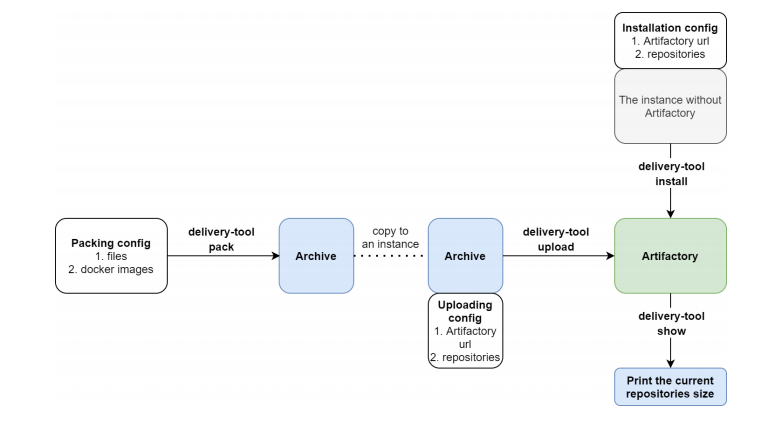
There are 4 functions of the Delivery tool:
- install - read an installation config and install Artifactory to the instance using ansible.
- pack - read a packing config, download files and docker images using skopeo, create an archive with some structure.
- upload - unpack the archive, parse an uploading config and the archive structure and upload files to Artifactory instance. Show full and delta size of repositories.
- show - show space by a repository.
There are the things that have to be pre-installed on your system
- Python 3.8 ✅
- Docker 20.10.7 ✅
- Docker-compose 1.29.2 ✅
- Skopeo 1.4.0 ✅
- Ansible 2.11.1 ✅
There is an information about Delivery tool usage
-
Set your configurations
Change
config.yamlandartifactory.yamlaccording to the example below. -
Specify your credentials for Artifactory instance
Note, that credentials must be
ARTIFACTORY_LOG=admin:ARTIFACTORY_PASS=passwordfor the first Artifactory launch. -
Run the tool
Execute
delivery-tool-rukavishnikov-0.1.0.pyzwith any function
-
install
python3 delivery-tool-rukavishnikov-0.1.0.pyz install [-r 1]-ris optional, so you can include it, if you need to create Generic repository automatically. Note, that you need to specify defaultadmin/passwordcredentials forinstall -r Trueoption.For the next functions you need to contain
create.yamlandartifactory.yamlfiles in the same directory as delivery-tool-rukavishnikov.pyz -
pack
python3 delivery-tool-rukavishnikov-0.1.0.pyz pack -
upload
python3 delivery-tool-rukavishnikov-0.1.0.pyz upload
Generic and Docker repositories are required for upload and show functions.
Artifactory UI also requires a manual action in order to push images with skopeo:
- Go to Artifactory -> General -> HTTP Settings
- Choose
portas Docker Access Method - Choose
nginxas Server Provider - Specify
localhostas Internal Hostname and Public Server Name - Specify HTTP Port (17001 according to my example)
Don't forget to export your new credentials, do:
export ARTIFACTORY_LOG=<your login>
export ARTIFACTORY_PASS=<your new password>-
show
python3 delivery-tool-rukavishnikov-0.1.0.pyz show
   files:
   - https://docker.bintray.io/artifactory/bintray-tools/com/jfrog/bintray/client/api/0.2/api-0.2.jar
   - https://docker.bintray.io/artifactory/jfrog-cli/v1/1.0.0/jfrog-cli-linux-386/jfrog
   images:
   - docker.bintray.io/jfrog/artifactory-pro:7.19.8
   - docker.bintray.io/postgres:13.2-alpine
   - docker.bintray.io/jfrog/nginx-artifactory-pro:7.19.8
You need to specify file URLs in files section and Docker images in images section according to the example above
   url: http://10.0.2.15:8082/artifactory
   docker_registry: 10.0.2.15:17001
   repositories:
     files: delivery_tool.files
     docker: delivery-tool.docker
   home_dir: /home/mikhail/.jfrog
   lic_path: /home/mikhail/artifactory.lic
This configuration file needs to contain the Artifactory URL specified in url section and docker registry.
In repositories section there should be a Generic repository name in files and Docker repository name in docker.
lic_path is a path to your artifactory.lic file, that contains Artifactory license key.
Besides, please, specify the Docker images in images section and your Artifactory home directory in home_dir.